

Right now, a parent in your neighborhood is typing “daycare near me” into Google. They need childcare. You have open spots. But your center never shows up.
That is not bad luck. That is a fixable problem — and the fix is completely free.
The Enrollment Funnel Starts on Google, Not at Your Front Door
Word-of-mouth used to be the lifeblood of childcare enrollment. And it still matters. But here is what has changed: even when a parent gets a personal recommendation, they Google the center before they ever pick up the phone.
Parents searching for childcare are not browsing casually. They are ready to act. “Daycare near me” gets 673,000 searches per month. “Preschool near me” gets 165,000. These are parents with a real need, searching right now.
If your center does not appear in the top three local results — what Google calls the “local pack” — you are not on their list. Those top three spots capture 75% of all clicks. Everyone else is competing for the scraps.
The question is not whether parents are searching for you. They are. The question is whether Google knows you exist.
Why Most Childcare Centers Are Invisible Online
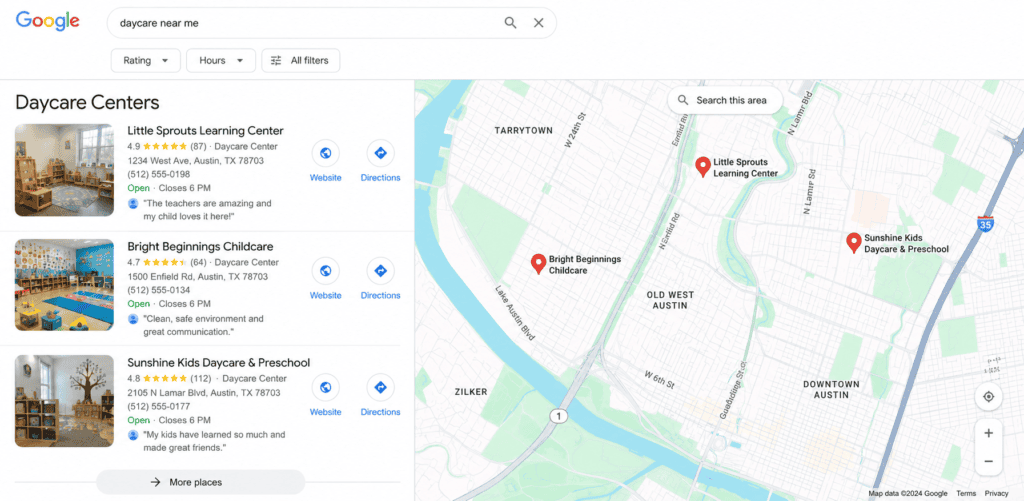
Here is the uncomfortable truth: only 35% of small businesses have a Google Business Profile (GBP). That means the majority of childcare centers — including many great ones — are essentially invisible to parents searching online.
It is not because they are not running excellent programs. It is because their Google listing is incomplete, inactive, or never claimed in the first place.
Google Business Profile signals account for 32% of local search ranking factors — more than your website, backlinks, and online citations combined. A complete, active GBP is the single most powerful free marketing tool available to a childcare center. And most directors do not know it exists.
Customers are 2.7x more likely to consider a business reputable when they find a complete Business Profile on Google. They are 70% more likely to visit. Complete profiles appear in 70% more discovery searches than incomplete ones.
The competitive landscape is wide open. Most of your local competitors have a basic listing with outdated information and no recent activity. A focused effort on your GBP can move you up in local results within a few months.
The 6 GBP Elements That Drive Enrollment Inquiries
1. Claim and Verify Your Profile
If you have not claimed your listing, someone else’s information might be showing up — or nothing at all. Go to business.google.com, search for your center, and claim it. It is free and takes minutes. This is step one, and nothing else matters until it is done.
2. Choose the Right Categories
Your primary category should be “Child Care Agency.” Add secondary categories that match your programs: “Day Care Center,” “Preschool,” “After School Program,” “Learning Center.” This is one of the strongest signals Google uses to match your listing to parent searches. Childcare centers that add “Preschool” as a secondary category (when they offer pre-K) appear in 44% more local search queries.
3. Write a Description That Actually Sells Your Program
You have 750 characters. Use them. Include your city, the age groups you serve, your educational philosophy, your programs, and a clear call to action to schedule a tour. Most descriptions are generic. Specificity wins — and it is what separates a listing that gets calls from one that gets scrolled past.
4. Upload Photos Consistently
Listings with 100+ photos get 1,065% more clicks than the average listing. Parents want to see your classrooms, outdoor play areas, staff, and daily activities before they ever visit. Upload at least 20 high-quality photos to start, and add new ones regularly. Google rewards active profiles — and so do parents.
5. Post to Your GBP Regularly
GBP posts work like a social feed directly on your Google listing. Share enrollment openings, open house dates, curriculum highlights, and seasonal activities 2-3 times per week. This signals to Google that your business is active, and it gives parents a reason to take action when they find you.
6. Make Sure Your Information Is Accurate Everywhere
Your business name, address, and phone number must be identical across every directory: Google, Yelp, Care.com, Winnie, Facebook, Bing Places, your state’s childcare licensing directory. Inconsistencies confuse Google and erode trust with parents. 62% of consumers would avoid a business if they found incorrect information online.
Reviews Are the New Word-of-Mouth and They Are Searchable

97% of parents read online reviews before choosing a daycare. 71% use Google specifically. Reviews are not just social proof — they are a ranking factor.
Businesses with 50+ reviews appear in the local pack 266% more often. A 4.5-star average is the sweet spot. A perfect 5.0 can actually look suspicious to skeptical parents.
Building a review system does not have to be complicated:
-
- Ask at the right moment: after a successful first week, a milestone, or the end of the school year
-
- Send a direct link to your Google review form via text — it gets 3x the response rate of email
-
- Put a QR code in your lobby at pickup
-
- Respond to every review within 24 hours, positive and negative
One negative review without a response scares away more parents than 10 positive reviews attract. Responding shows you are engaged, professional, and care about your families’ experience.
Your Quick-Start Checklist
If you are starting from zero, here is where to focus first:
-
- Claim and verify your Google Business Profile at business.google.com
-
- Set your primary category to “Child Care Agency”
-
- Add relevant secondary categories
-
- Write a specific, compelling business description
-
- Upload 20+ high-quality photos
-
- Check that your name, address, and phone number match across all directories
-
- Ask your most loyal families for a Google review this week
-
- Schedule your first GBP post
None of this requires a marketing budget. It requires about two hours of focused effort and a commitment to keeping it active.
The Bottom Line
A single enrollment at your childcare center represents $30,000 or more in lifetime revenue. The parents who would fill your open spots are searching for you right now. Your Google Business Profile is the bridge between their search and your front door.
The centers that show up consistently in local search are not spending more on ads. They have simply done the work to make sure Google knows who they are, what they offer, and that they are worth a parent’s trust.